
Sell Your
Nothing Phone (4a) Pro

Why Trust Us?





Four payment methods
Zelle, Bank Transfer, Check and PayPal

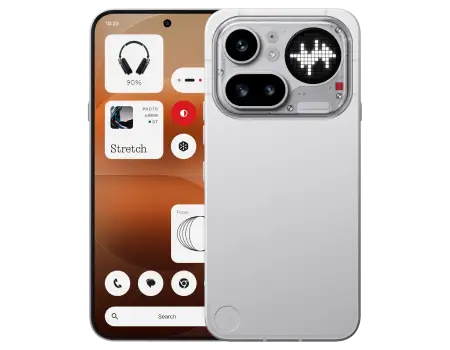
Your Nothing Phone (4a) Pro’s trade-in price comes down to four things: physical condition, storage size, carrier status, and whether everything works as it should. Released in 2026 with a 6.83-inch 144Hz AMOLED screen and a Snapdragon 7 Gen 4 chip, the (4a) Pro is still a recent model with steady buyer demand. A clean screen, a scratch-free back panel, working Glyph lights, and the 256GB version will all push your offer higher. Answer a few quick questions in our online calculator to see exactly what we’ll pay for your Nothing Phone (4a) Pro today.
GadgetPickup makes trading in your Nothing Phone (4a) Pro quick and predictable. You get a firm price up front, free shipping, and a fast payout with no surprise deductions or service fees. Thousands of sellers across the US have trusted us with their phones, and our ratings on Trustpilot and Google show it. Skip the risk of dealing with strangers on marketplaces and turn your Nothing Phone (4a) Pro into cash with a company that handles used devices every day.
You can sell your Nothing Phone (4a) Pro in four easy steps:
- Pick your storage, carrier, and condition to get an instant price
- Pack your phone and send it with the free prepaid label we email you
- Our technicians check the device and confirm it matches your description
- Get paid quickly by PayPal, check, or another payout method you choose
Your package is tracked from your door to our facility, and our support team can help at every step until your payment arrives.
Yes. We buy the Nothing Phone (4a) Pro whether it’s unlocked or tied to a carrier contract. Thanks to its triple 50MP camera system, 5400 mAh battery, and signature transparent design, the (4a) Pro sells well in the resale market, so we make offers on phones from every major US network:
- AT&T
- Verizon
- T-Mobile
- Google Fi
- Unlocked
Just choose your carrier when you request a quote. As long as the device is paid off and not blacklisted, we’ll make you a fair offer.
Before shipping your Nothing Phone (4a) Pro, back up your photos, contacts, and files, sign out of your Google account, and then do a factory reset:
- Open the ‘Settings’ app
- Tap ‘System’
- Go to ‘Reset options’
- Select ‘Erase all data (factory reset)’
- Confirm with your PIN, pattern, or password
The reset wipes every app, account, and personal file from the device. Signing out of Google first turns off Factory Reset Protection, so your phone can be inspected and processed without delays.